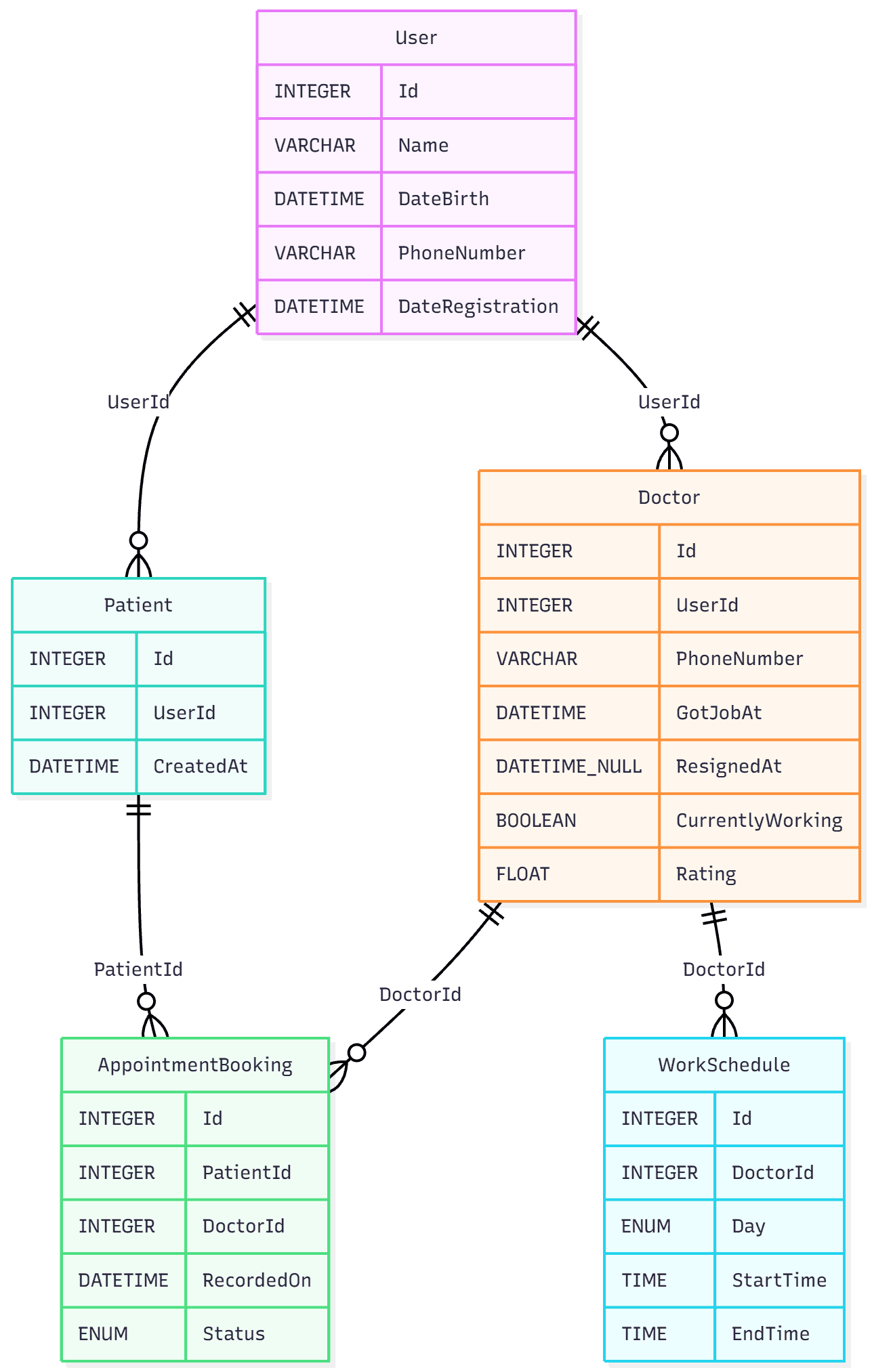
After describing the functionality, the next stage is identifying the main anchors (data entities) that define the data structure and the relationships between them. At this stage, the previously described functionality is very helpful because you can compare the database schema with the functional requirements.
The process looks like this:
- Create the database schema.
- Re-read the application description and analyze whether the functionality can be implemented based on the current schema.
- If everything is feasible, proceed further.
- If inconsistencies are found, update the database schema.
Example
Users can create reminders with a date, time, and optional recurrence settings (daily, weekly, weekdays). After saving, the reminder is placed in a background service queue that periodically checks upcoming events. When the reminder time comes, the service sends a push notification to the user's device. If the user dismisses or opens the notification, the reminder status is updated (for example, "completed" or "snoozed"). A strict data structure allows uniquely identifying reminders and optimizing indexing by execution time and status.
While re-reading this description, you realize that you created the anchors:
UserReminderPushNotification
But then you notice that the schema is missing the reminder status, which is necessary for the described functionality. At this point of reviewing requirements and the DB schema, you identify this gap and add the Status field to the Reminder entity.
Textual Description of the Database Structure
All defined anchors are stored in a single file. To enable versioning of the schema, it is recommended to place this file in a Git repository.
The structure of the file is as simple as possible. It contains only the described anchors in a specific record format. Each anchor consists of two elements: the anchor name and the fields it contains.
The fields, in turn, include the field name, data type, NULL or NOT NULL constraint, and a flag indicating whether it is a foreign key.
Anchor format
EntityName
    Field: type // optional comment
    AnotherField: type?
    ForeignKeyId: int FK(OtherEntity)
Example anchors for the doctor appointment system
User // regular system users
    Id: int
    Name: str
    DateBirth: datetime
    PhoneNumber: str
    DateRegistration: datetime

Patient // patients (extends User)
    Id: int
    UserId: int FK(User)
    CreatedAt: datetime

Doctor // doctors (also extends User)
    Id: int
    UserId: int FK(User)
    PhoneNumber: str
    GotJobAt: datetime
    ResignedAt: datetime? // can be NULL
    CurrentlyWorking: bool
    Rating: float

WorkSchedule // doctors' working schedule
    Id: int
    DoctorId: int FK(Doctor)
    Day: enum //(Monday,Tuesday,Wednesday,Thursday,Friday,Saturday,Sunday)
    StartTime: time
    EndTime: time

AppointmentBooking // appointment bookings
    Id: int
    PatientId: int FK(Patient)
    DoctorId: int FK(Doctor)
    RecordedOn: datetime
    Status: enum //(Pending, Confirmed, Completed, Canceled)
While writing anchors, it becomes easy to define primary key constraints and foreign key relationships. For example, you can immediately see whether a composite primary key is needed or if a simple auto‑incrementing integer is enough.
Describing relationships textually also simplifies future steps such as adding foreign key constraints or planning indexing that will optimize queries later.
Why this is faster and more convenient than graphical editors:
- Add an entity → just paste a new text block
- Change a field → edit one line
- Rename an entity → find + replace across the file
- Everything is version‑controlled in Git